Movie Collector Alternative
Looking for a Movie Collector alternative? Many collectors come to us after Collectorz effectively stopped the desktop product — development moved to a web-only service, perpetual licenses were dropped, and the only option left is a recurring subscription. That frustrates users who bought Movie Collector Pro years ago and especially people who keep large libraries on external hard drives: a browser catalog is a poor fit when your files live on USB disks that are not always connected.
All My Movies is a native Windows program with TMDB lookup, direct links to video files on any drive, and both subscription and perpetual license options. Below is a side-by-side comparison and import instructions from Movie Collector.
Movie Collector vs All My Movies at a glance
| Feature |
Movie Collector (Collectorz) |
All My Movies |
| Desktop app for Windows |
Discontinued — web version only |
Native Windows application |
| Perpetual (one-time) license |
Subscription only — no lifetime license |
Perpetual license available |
| Movies on external / offline drives |
Web catalog — awkward for USB archives |
Scan & link files on any connected drive |
| Import existing collection |
Export to XML, then open in AMM |
Menu: Database → Open Movie Collector database |
| TMDB & online movie lookup |
Limited / discontinued for many users |
TMDB and 14+ sources |
| Play video from the catalog |
No |
Yes — launch files from the movie card |
| TV series presentation |
Basic |
Clear season & episode layout |
| Bulk add movies from hard drive |
Slower for some users |
Scan drive, auto-fill technical details |
| Cover art quality |
Varies |
High-resolution posters |
| Actor / person lookup |
Limited |
Photos & bios from online databases |
| Export to HTML / PDF / Excel |
Limited |
Multiple formats |
| Discount for switchers |
— |
30% off for migrants |
Import your Movie Collector data to All My Movies
Yes, it is possible to import your movie collection created with Movie Collector to All My Movies quickly and easily. Simply follow the step-by-step instructions listed below:
- Start Movie Collector with your database
- Use menu item "File-Export to-XML" to save your database in XML file
- Close Movie Collector and start All My Movies
- Use menu item "Database - Open Movie Collector database" to transfer your entire collection to All My Movies.
Note: All My Movies will open your last saved XML automatically. If you want to select XML file yourself, please hold Shift key pressed while clicking on menu item "Database-Open Movie Collector Database"
Movie Collector Migrants Special Offer
If you already have a Movie Collector license you do not need to order All My Movies at full price. We offer a great discount for migrants from Movie Collector. Proceed to our special offer page to save some money.
What users say after switching from Movie Collector
A recurring theme in support mail from former Movie Collector users: they want a desktop program they can own, not a monthly web subscription; they miss TMDB and flexible online lookup; and they need software that treats an external hard drive full of MKV/AVI files as a first-class citizen — plug the disk in, scan it, play from the catalog, unplug it until next time. All My Movies is built for exactly that workflow.
Below are comments from users who migrated to All My Movies from Movie Collector:
- "play movies directly from the database"
- "easy look up on the net, adding a trailer feature"
- "lookup of actors and being able to add screenshots and quite a few other features"
- "I've been using Movie Collector Pro for a while and my father, who also collects DVDs, told me about your product. Your interface seems better and the quality of the downloaded images is far better."
- "Your software was able to import my existing collection with ease. The competitor product struggled. Once the data was loaded, performance was the most important aspect, and your product did searches, with custom fields, quickly and easily. Your product also did a much better job in searching data off of internet sources. "
- "I love the ease of use that this program has over Collectorz."
- "Looking for new one since Movie Collector no longer interfaces to TMDB."
- "Your software does a better job of managing the movie stars and I can download their information from TMDB"
- "I want an easy to use database that showcase the cover art in a more pleasing way such as All My Movies. I also love the feature to connect the actual movie to an easily accessible link, that is fantastic and simple to setup."
- "I changed from "Collectorz.com Movie Collector" to AllMyMovies because of one major reason. It's available in my native language, Norwegian."
- "Ability to play video clips, Cleaner GUI, Plug in support"
- "All My Movies has a much easier to use interface for bulk adding movies off my hard drive and automatically filling in the technical details of the files."
- "Better support of TV shows."
- "I like the look and feel of your application. I also like that your product allows me to launch the movies I have saved on my hard drive directly from the info page."
- "Because of the decision of using just the Collectorz database as a source for searching the movies information."
- "I like the way the TV series episodes are presented"
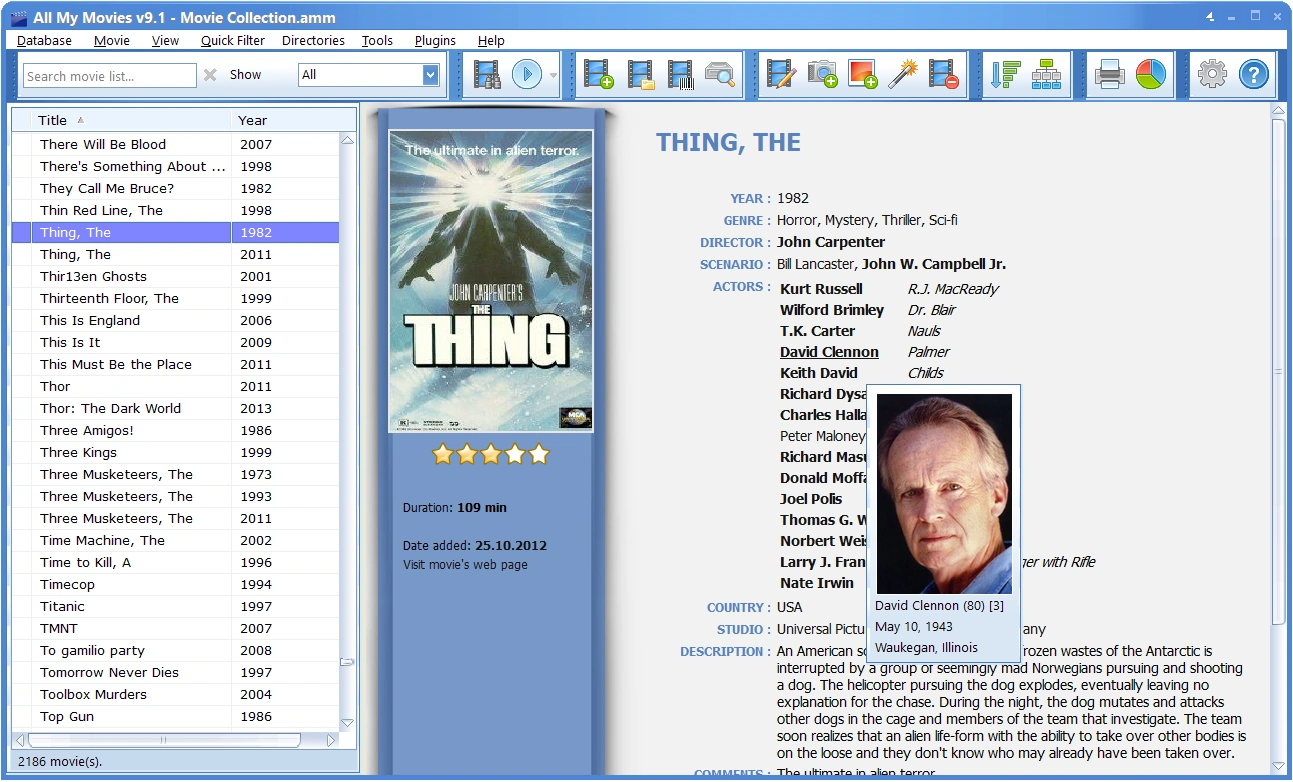
Movie Collector vs All My Movies — screenshots:
Your best choice is All My Movies
Download Your Copy Now
Our customer say
Nice job, guys!"The program is really awesome! I've been using it for a year already and love it more and more!!! One of the most valuable things for me is that I can have my collection on my phone whenever I go to a movie shop: it allows me to avoid buying the movies I have already in my 600-movie collection.It's a real must-have for any movie-lover!
Thanks to the developers!))"
Michael D. Briggs